 Notes2Markers by The Editor's Friend
Turn notes emails into timeline markers.
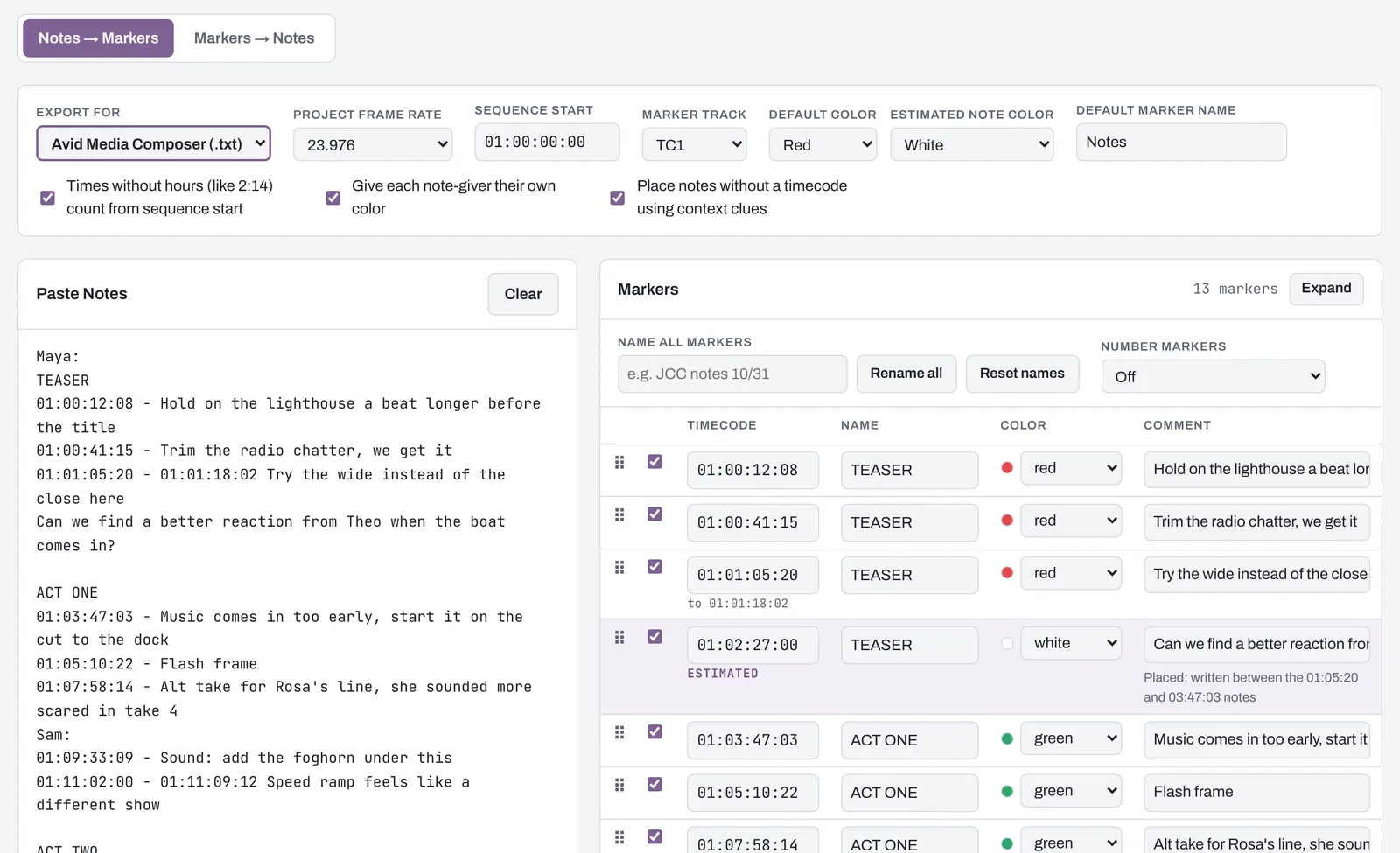
Paste the notes from a director, producer or studio. Notes2Markers reads every timecode, places the notes that don't have one, and saves a marker file for Avid Media Composer, Premiere Pro or DaVinci Resolve.
Harbor Lights 103, director's cut notes
Notes arrive messy. That's fine.
Notes come from phones, from the back of a mix stage, from three people replying to the same thread. Notes2Markers is built around the way notes are really written, not the way a form would want them.
When it fixes a typo or has to guess a position, it marks that note so you can check it before you import.
| What they wrote | The marker you get |
|---|---|
| 1:02:14:08 - 1:02:20:00 Lose this exchange | A marker at 01:02:14:08 that keeps the end time in its text |
| 14:32 trim the walk | Read from your sequence start, so 14:32 lands at 01:14:32:00 |
| 1:10:18::01 / 1: 00:13:15 / 1:17:4500 | Typos fixed and flagged for you to check |
| Tighten the top of act two | Placed at the start of Act Two and marked estimated |
| Dana: Network: | Each note-giver gets their own marker name and color |
| 29.97 drop-frame, 23.976, 25, 59.94 and more | Timecode math that matches your project's frame rate |
Import it into the editor you're cutting in
Pick your editor and save. The file is made the way that editor expects, colors included.
Avid Media Composer
.txt marker file- Load your sequence in the Record monitor.
- Open Tools, then Markers.
- Right-click in the Markers window, choose Import Markers and pick the file.
Premiere Pro
.xml with marker colors- Choose File, then Import, and pick the file.
- Premiere adds a sequence that holds the markers.
- Paste your cut into it, or copy the markers onto your own sequence.
DaVinci Resolve
.edl timeline markers- In the Media Pool, right-click your timeline.
- Choose Timelines, Import, Timeline Markers from EDL.
- Pick the file.
And back again: markers into a notes list
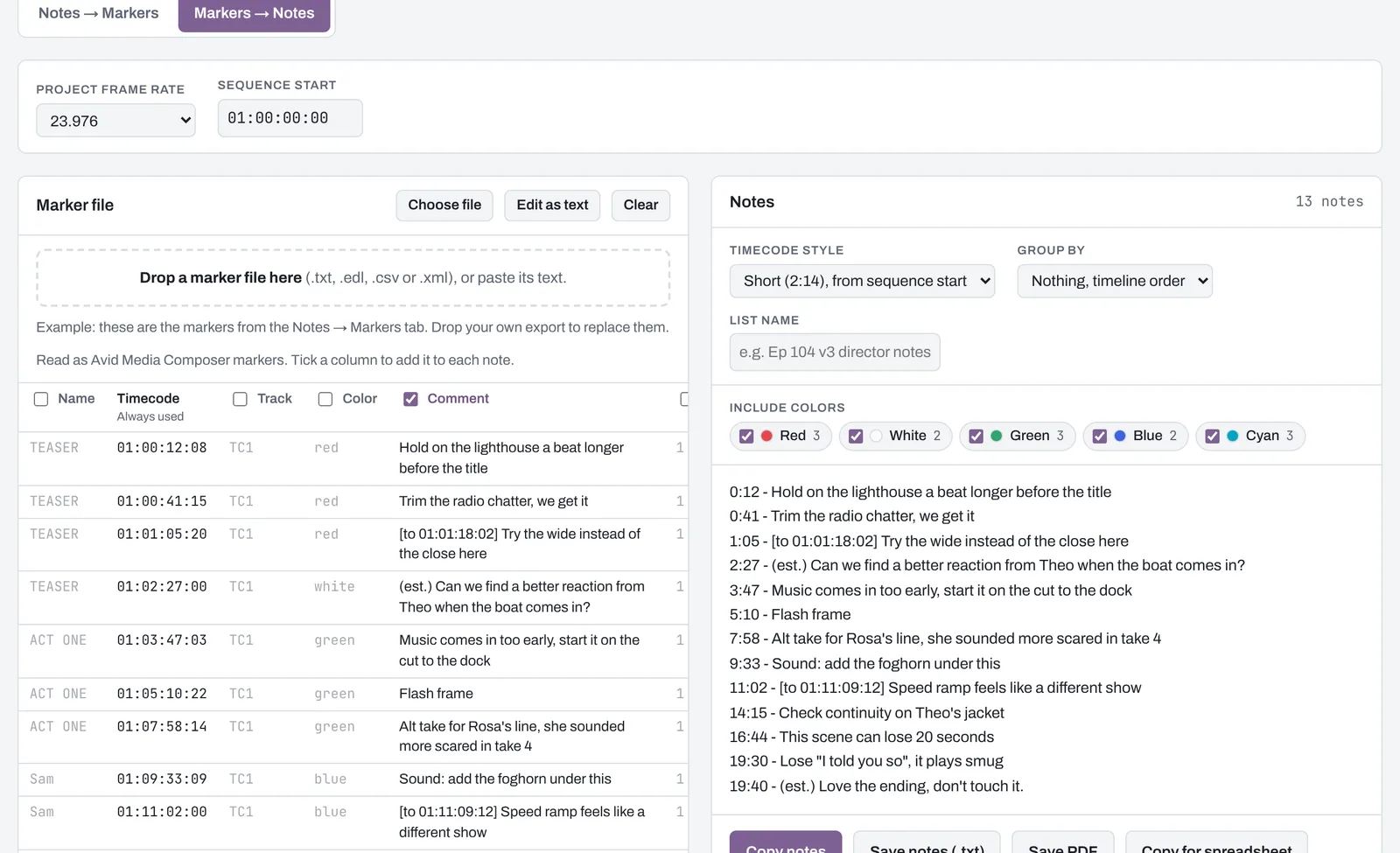
Export the markers from your timeline and drop the file in. You get a clean list to send to producers, the next editor or the mix, as text, a PDF or a spreadsheet. Choose which columns to include, group notes by person or color, and leave out the colors you don't need.
Your notes stay on your computer
- Notes2Markers doesn't upload anything. There's no account, no cloud and no tracking.
- It works with no internet connection, so it's at home on locked-down edit bay machines.
- Safe for notes under NDA: nothing you paste is sent anywhere.
One price, no subscription
- Mac (Apple Silicon and Intel) and Windows 10 or 11
- Use it on up to two of your own computers
- Free updates for every version 1 release
- Refund within 14 days if it doesn't work for you
Sales tax or VAT is added at checkout where it applies. Payments are handled by Lemon Squeezy.
Questions
Which versions of Media Composer, Premiere and Resolve does it work with?
It's tested with current versions of all three. Any Media Composer that can import a marker text file from the Markers window should work.
What happens to notes that don't have a timecode?
Notes2Markers places them using what the email says: the act or scene heading above them, words like "the top" or "the end", character names, and the notes around them. Each placed note is marked estimated so you can check it. You can also turn this off and get those notes as a separate list.
Does it work with Final Cut Pro?
Not yet. Let us know at support@theeditorsfriend.com if you need it.
Does one purchase cover Mac and Windows?
Yes. Your license covers both, on up to two of your own computers.
How do I get the app after I buy?
Your receipt email has the download links and your license key. See the download page for what to do the first time you open it.